


AI Construction Safety & EHS
AI Safety Intelligence for Every 360° Site Walkthrough
Turn routine site walks into a located safety record. AI highlights likely hazards, safety officers confirm them, and each one is tracked through corrective action to reinspection.
- Hazards located by floor, zone and plan position
- Corrective actions verified with reinspection captures
- Dated 360° coverage of every area walked
What Is SitePace.ai AI Safety & EHS?
SitePace.ai AI Safety & EHS turns routine 360° site walks into a located safety record. AI highlights likely hazards such as missing PPE, safety officers confirm them, and each one is tracked through corrective action. Safety walks do not identify people.
Interactive Example
Explore Construction Hazards Through AI Assisted Visual Inspection.
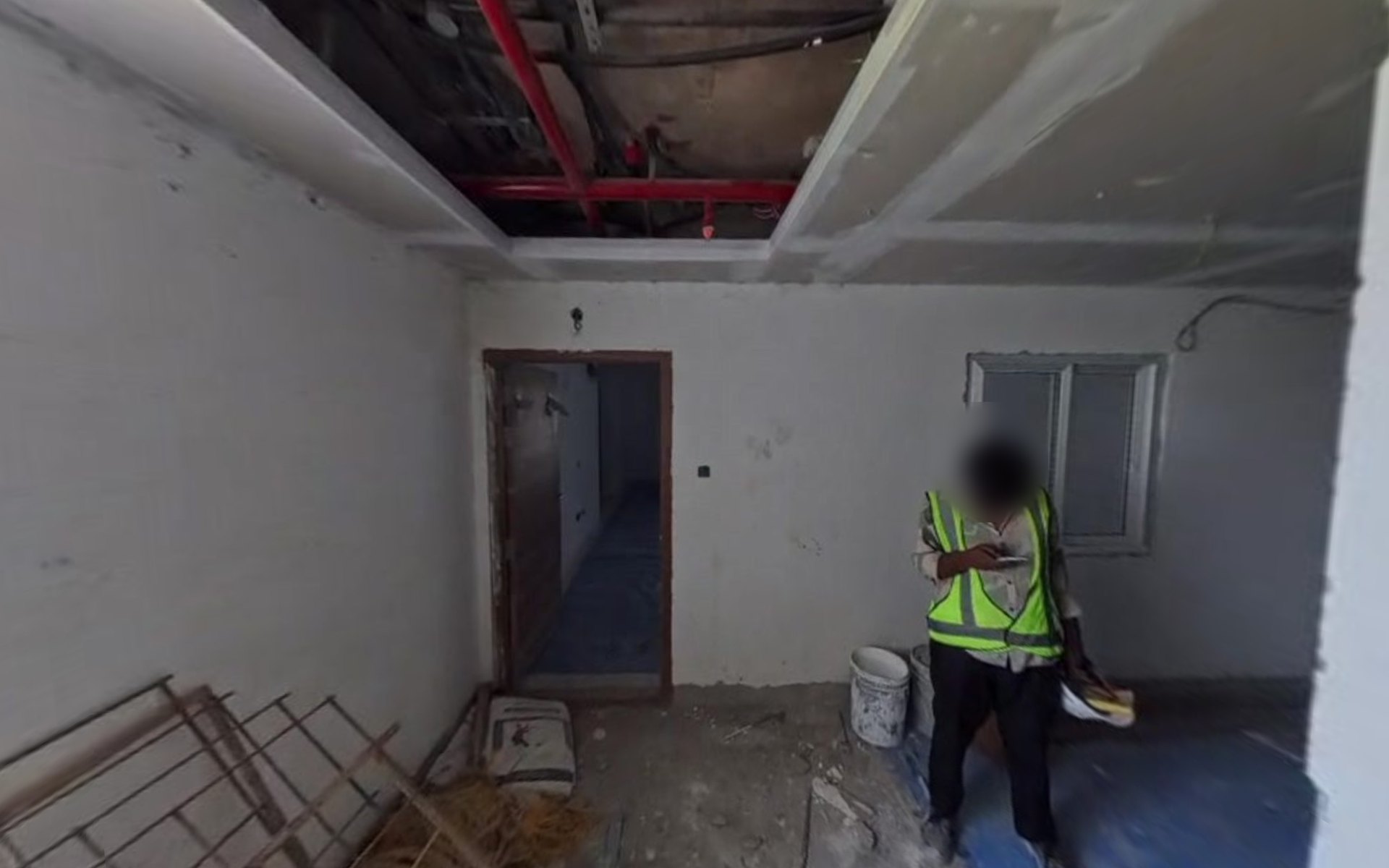
A real SitePace 360° capture of a room during fit out. Seven safety conditions visible in this frame are listed beside it. Select one to see where it is, the hazard and the corrective action. The worker's face is blurred for privacy.
- PPE
- Access & Egress
- Housekeeping & Storage
- Electrical & Fire
7 observations in this capture
Items are color coded by hazard category. Each item is visible in this real frame; the site safety team reviews it before any action is assigned.
- Detected
- Reviewed
- Assigned
- Corrected
- Reinspected
- Closed
- Engineering Interpretation
- Head protection is missing in an area with overhead services work in progress.
- Corrective Action
- Supervisor to stop and brief the worker, issue a helmet and record the toolbox talk. Spot check in the next walk.
More Detail
- Hazard Category
- PPE: head protection not worn
- Location
- Level 11 · Unit 1102 · near the window
- Visual Evidence
- 360° frame shows a worker in a high visibility vest with no helmet, under an open ceiling bay.
Read this example as text (7 items)
1. Worker Without a Safety Helmet
- Hazard Category
- PPE: head protection not worn
- Location
- Level 11 · Unit 1102 · near the window
- Visual Evidence
- 360° frame shows a worker in a high visibility vest with no helmet, under an open ceiling bay.
- Engineering Interpretation
- Head protection is missing in an area with overhead services work in progress.
- Corrective Action
- Supervisor to stop and brief the worker, issue a helmet and record the toolbox talk. Spot check in the next walk.
2. Open Ceiling Bay With Exposed Services
- Hazard Category
- Electrical & fire: exposed services overhead
- Location
- Level 11 · Unit 1102 · ceiling, center
- Visual Evidence
- 360° frame shows the false ceiling open, with cable runs and the red sprinkler line exposed.
- Engineering Interpretation
- Work is in progress overhead. Loose cables and open ceiling edges are a risk to anyone working or passing below.
- Corrective Action
- Confirm cables are dead or protected, cordon the area below during ceiling work, and close the bay once services are tested.
3. Steel Frames Leaning Against the Wall
- Hazard Category
- Housekeeping & storage: unsecured material
- Location
- Level 11 · Unit 1102 · left wall
- Visual Evidence
- 360° frame shows several steel frames propped against the wall with loose packing at their base.
- Engineering Interpretation
- Unsecured frames can slide or fall and create a trip and impact hazard in the working area.
- Corrective Action
- Move to the designated storage area, or lay flat and secure. Keep the walkway clear.
4. Cement Bags and Debris at the Doorway
- Hazard Category
- Access & egress: obstructed route
- Location
- Level 11 · Unit 1102 · doorway to corridor
- Visual Evidence
- 360° frame shows cement bags and loose debris beside and in front of the doorway.
- Engineering Interpretation
- The only visible exit from the room is partly blocked, which slows movement and evacuation.
- Corrective Action
- Clear the doorway and keep a marked, unobstructed route to the corridor.
5. Loose Debris on the Floor
- Hazard Category
- Housekeeping & storage: debris on walkway
- Location
- Level 11 · Unit 1102 · floor, center
- Visual Evidence
- 360° frame shows broken material and dust across the floor where the protection sheet has ended.
- Engineering Interpretation
- Loose material underfoot is a slip and trip hazard.
- Corrective Action
- Daily cleanup by the trade working in the room. Extend floor protection.
6. Buckets Left on the Walkway
- Hazard Category
- Housekeeping & storage: material in walkway
- Location
- Level 11 · Unit 1102 · below the window
- Visual Evidence
- 360° frame shows paint or material buckets standing in the walking area.
- Engineering Interpretation
- Minor trip hazard and a spill risk if knocked over.
- Corrective Action
- Store buckets against the wall or in the material zone with lids closed.
7. Loose Cable Along the Wall Top
- Hazard Category
- Electrical & fire: unsecured cable
- Location
- Level 11 · Unit 1102 · right wall, near ceiling
- Visual Evidence
- 360° frame shows a cable looping loose along the top of the wall.
- Engineering Interpretation
- An unsecured, possibly temporary cable can be snagged or damaged during work.
- Corrective Action
- Electrical supervisor to confirm the cable's status, then clip it or route it in conduit.
This example uses a real SitePace capture; the markers and labels are illustrative. Request a demo to walk through the same workflow on your project.
The Technology
Safety Inspections That Cover More of the Site
How can AI support construction EHS inspections?
AI reviews every 360° site walk for visible hazards such as missing Personal Protective Equipment (PPE), open edges, poor housekeeping and electrical risks. Safety officers confirm real hazards and assign actions, so more of the site gets inspected.
More Detail
A typical walk produces a checklist and a few photos. SitePace.ai gives you a dated 360° record of every area walked, so officers review flagged spots instead of walking the floors again.
CCTV AI Monitoring watches 24/7, but only the areas where cameras are installed. 360° walks cover interior floors and shafts that cameras cannot see, at the frequency of your walks. The two work together.
Does SitePace.ai need GPS or beacons indoors?
No. Every 360° view is placed on your floor plan automatically. There is no GPS, Bluetooth beacon, WiFi or extra hardware to set up.
One Platform, Five Stages
Capture the Whole Site
Every corner recorded on one normal site walk. No tripods, no manual photo naming.
Place Every View on Your Plans
Each view lands on the right floor and spot, with its date and time. Find any view in seconds.
Spot Issues Automatically
AI flags installed work, quality defects and safety hazards for your engineers to confirm.
Compare With Design and Schedule
Check site conditions against Building Information Modeling (BIM), drawings and planned activities, location by location.
Turn Findings Into Actions
Every finding gets an owner, due date and status, and flows into snag lists, NCRs, reports and dashboards.
Capabilities
Hazards Covered and How They Are Managed
Organized by hazard category and corrective action process. Expand any capability for details.
AI Hazard Identification
Construction Hazard Flags
Likely hazards highlighted in every 360° capture and pinned on the plan.
Each flag shows its floor, zone and date, and becomes an observation only after the safety team reviews it.
PPE Monitoring
Helmets, high visibility clothing, visible fall protection equipment and workers in defined areas.
Highlights visible PPE conditions and workers in restricted areas. Observations record the condition and location, not personal identity.
Work at Height Observations
Open slab edges, shafts, missing guardrails, floor openings and missing edge protection.
Flags perimeter edges and openings without adequate protection, and records the protection status of shafts and risers over time.
Scaffolding and Temporary Access
Platforms, toe boards, access points and barricading.
Flags incomplete platforms, missing toe boards or guardrails, and unsafe access points for the scaffold inspector to verify.
Site Housekeeping
Debris, unsafe stacking, obstructions, trip hazards and material management.
Identifies debris accumulation, unstable stacks and materials obstructing routes, including recurring problem areas across walks.
Electrical and Fire Safety
Temporary wiring, fire equipment access, hot work areas and egress.
Highlights temporary wiring hazards, obstructed extinguishers and exits, and hot work areas, for review against your site rules and permits.
Safety Management
Hazard Management by Location
Observations organized by floor, location, work zone and inspection date.
Pinned on the plan and in the 360° view, so supervisors know where to act. Filter by zone, date and category.
Corrective and Preventive Actions
Record, communicate, rectify and verify each safety observation.
Assign owner, due date and status. Verify fixes with a reinspection capture, and use preventive actions to tackle the causes of recurring findings.
Historical Safety Analytics
Repeat observations, trends, recurring hazards and site level visibility.
Dated records show which hazards recur, in which zones and under which activities, informing toolbox talks, supervision and site planning.
360° and CCTV Integration
Walkthrough observations and CCTV AI alerts in one review.
See walkthrough observations and CCTV AI alerts side by side, so the safety team works from one record.
In the SitePace App
CCTV Dashboard and AI Alerts
Live cameras, online status, today's and critical alerts, and an AI summary.
Camera alerts sit alongside 360° walk observations, so the safety team works from one record.
Safety Observations as Site Notes
Hazards pinned to the plan with photos, owners, due dates and PDF reports.
Confirmed hazards become Site Notes with location, photos, an owner and a due date. Close them with reinspection evidence and a PDF report.
Need to map this to your EHS procedures?
Engineering Workflow
How Each Hazard Is Handled
From capture to EHS reporting, with a qualified safety professional reviewing every AI suggestion.
Routine safety walks record every area covered.
Every capture is placed on the floor plan, with no GPS needed.
AI highlights likely hazards by category.
The safety officer reviews each flag in its 360° context.
Confirmed hazards are recorded with location and evidence.
Actions are assigned to the responsible supervisor.
A repeat capture verifies the correction.
Observations, actions and trends feed EHS reports and audits.
Use Cases
How Safety Teams Use It
- EHS Managers
Oversee Safety Across Floors and Projects
Review flagged hazards and open actions by site, floor and category, and prepare audit evidence from located, dated records.
- Site Safety Officers
Inspect More of the Site on Every Walk
Let AI screen the capture first, confirm real hazards in context, and send them to the right supervisor with the exact location.
- Contractors and Supervisors
Close Actions With Proof
Receive observations with location and image, correct the condition, and let the next walk record the reinspection evidence.
See a SitePace.ai EHS Observation Report
See how located hazards, corrective actions and reinspection evidence come together in one report, or talk to our team about mapping them to your EHS procedures.
Technical FAQ
Questions Engineers Ask Us
Have a specific EHS requirement or audit format?
How does SitePace.ai inspect PPE compliance?
SitePace AI checks 360° captures for visible PPE such as helmets, high visibility clothing and fall protection equipment, and flags possible noncompliance with its location. The safety team reviews each flag. Observations record the condition, not the identity of individuals.
Can AI recognize hazards when working at height?
Yes. Open slab edges, floor openings, shafts and incomplete guardrails or edge protection are among the hazard categories flagged in walkthrough imagery, each located on the floor plan for the responsible supervisor.
How are safety observations mapped to locations without GPS?
Every 360° capture is placed on your floor plan automatically, with no GPS or extra hardware. Each hazard recorded in it gets a floor, plan position and date, so supervisors know exactly where to act.
How are corrective actions tracked?
Each confirmed observation is assigned to an owner with a due date and status. The correction is verified by a reinspection capture of the same position, and the observation closes with both images on record.
Can SitePace.ai support EHS audits?
Yes. Located, dated observations with corrective action and reinspection evidence give auditors a traceable record of what was found, who acted and when it was verified. Compliance responsibility remains with the project's duty holders.
How do 360° walkthroughs differ from fixed camera monitoring?
CCTV AI Monitoring watches the areas where cameras are installed 24/7 and keeps entry and vehicle logs, including people and license plates. 360° walks cover the floors cameras cannot see at the frequency of your walks, and safety walks do not identify people.
Does AI replace site safety inspections?
No. AI highlights likely hazards so qualified safety professionals can inspect more effectively. Confirming hazards, deciding corrective actions and meeting statutory duties remain with the site's safety team.
Related Products
Works Alongside the Rest of SitePace
Make Every Site Walk a Complete Safety Record
See AI assisted hazard identification on a real project and discuss how it fits your EHS inspections, corrective actions and audits.

