


What Is 360° Construction Site Documentation and How Does It Work?
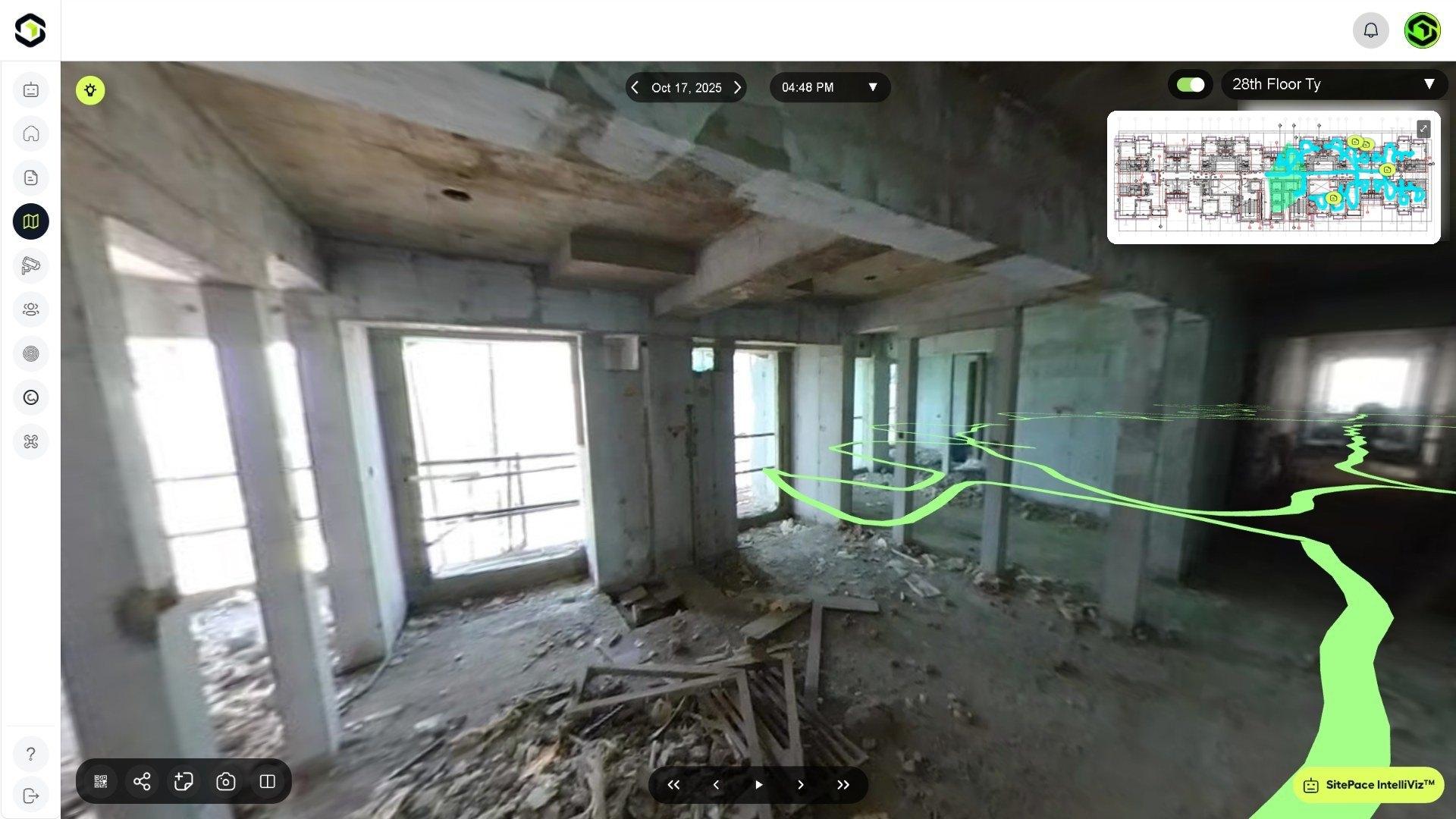
360° construction site documentation records the areas covered on a site walk using a 360° camera, capturing views in every direction. With SitePace.ai, each 360° view is placed on your floor plan automatically and saved by date, so your team can revisit any location remotely, compare two dates and track progress without travelling to site.
What Problem Does 360° Site Documentation Solve?
Most site records are still a checklist and a handful of 2D photos. Those photos are scattered across phones and teams, they show only what someone chose to point a camera at, and they are hard to find again by location. Site updates often depend on who took them, which leads to selective visuals and incomplete status reporting. Project managers and consultants then travel to site to see things for themselves, which costs time and delays decisions.
360° documentation changes the unit of record. Instead of only selected photos, you get a dated visual record of the areas walked, organised by floor and position on the plan. You can read more about these gaps on our Why SitePace page.
How Does 360° Site Capture Work?
The workflow is designed to fit into the site walk your team already does.
- Upload your floor plans. Floor plans are uploaded as PDF files and set up as the project.
- Walk the site. A team member attaches a standard 360° camera to their helmet, puts their phone in their pocket and does a routine site walk. No tripods and no manual photo naming. The SitePace.ai team provides remote onboarding when the project goes live.
- Views are placed on the plan. SitePace.ai places every 360° view on the right floor and spot, with its date and time. There is no GPS, Bluetooth beacon, WiFi or extra hardware to set up.
- Review the virtual walkthrough. The walk becomes an immersive virtual tour automatically. Your walked route appears in the 360° view and on the floor plan minimap, so you always know where you are.
If the site has no connection, you can capture offline and the captures sync when you are back online. Our Tech page explains how AI and the 360° helmet camera map walk paths and place captures on floor plans.
Which Camera Do You Need?
SitePace.ai works with standard 360° cameras. You can buy a recommended model, such as the Insta360 X5, or SitePace.ai can supply one. The number of cameras a project needs depends on site size and layout, and the SitePace.ai team plans coverage with you.
How Do Teams Find and Review Captures Later?
A 360° record is only useful if people can find the right view quickly. In the SitePace.ai viewer, captures are organized by place and date rather than by file name:
- Floor plan navigation. Click the route or any room on the plan to jump there, and switch floor, date and time inside the viewer.
- Calendar Timeline. Choose a floor, a date and a time to see the site exactly as it was captured.
- Compare Views. A synced split screen shows the same position on two dates, so changes are obvious at a glance. Each pane has its own date and time, and you can lock both views to look around together.
- Coverage view. Turn on Coverage to see which areas each walk captured and find missed rooms before the next walk.
Before your next site walk, review Coverage to identify any rooms that were missed.
Because every walk is saved by date from day one, you can return to any earlier capture for as long as your data is kept. That includes conditions that are now hidden, such as services above a ceiling before it was closed.
What Can Teams Do With 360° Site Records?
Capturing the site is the foundation. The value comes from what your team does with the record:
- Raise and close issues at their location. SiteQC lets teams capture site issues with photos or videos, add voice notes, assign work and track due dates and comments.
- Review progress remotely. Teams, consultants and clients can inspect the site virtually, which reduces the need for frequent physical site visits.
- Collaborate live. Live 360° streaming and Virtual Site Meet let your team walk the site together remotely.
- Share specific locations. QR codes, share links and screenshots let you share a view with consultants or clients without giving them the whole project.
- Support dispute resolution. Timestamped visual records give your team dated evidence of what was on site and when.
- Ask questions in plain language. IntelliViz™ supports AI-assisted analysis and reporting from site information.
How Is 360° Documentation Different From CCTV or Drone Surveys?
Each method covers a different part of the site, and they work best together:
- 360° walks cover interior floors, rooms and shafts that fixed cameras cannot see, at the frequency of your walks. Walk frequency is set per project; daily walks are common.
- CCTV AI Monitoring watches the areas where cameras are installed 24/7, with AI alerts for safety, vehicles and activity.
- Drone Intelligence covers large sites and external works with aerial surveys, orthomosaic maps and 3D models.
Where Does AI Fit In?
Once captures are placed on the plan, AI can review them. On SitePace.ai, AI Quality Control flags likely defects, AI Safety & EHS (Environment, Health and Safety) flags likely hazards and PPE (Personal Protective Equipment) issues, and Building Information Modeling (BIM) integration lets you compare the model with the capture of the same location.
It is important to be clear about the role of AI here. AI results are flagged for review, and your engineers confirm every result. AI output is decision support; it does not replace an engineer's judgement or a measured survey.
What Kinds of Projects Use 360° Site Documentation?
SitePace.ai is used on residential towers, commercial buildings, infrastructure, interiors and fit out, and industrial projects. It is designed for project managers, site engineers, contractors, architects and site workers without technical skills.
Frequently Asked Questions
Do I need GPS or beacons for 360° captures to be placed indoors? No. Every 360° view is placed on your floor plan automatically, with no GPS, Bluetooth beacon, WiFi or extra hardware to set up.
How long does it take to get started? Our team sets up your project, floor plans and access during onboarding, and trains your users remotely when your project goes live.
Is there a limit on how many captures or users we can have? No. Every SitePace.ai plan includes unlimited 360° captures and unlimited users. Pricing is based on your project's area, number of floors and duration.
Can we capture where there is no internet on site? Yes. You can capture offline, and captures sync when you are back online.
See 360° Site Documentation on Your Project
Want to see how a normal site walk becomes a dated, located record of your whole project? Book a demo with the SitePace.ai team at https://sitepace.ai/contact-us.

